
Price on Application (P.O.A): Show "P.O.A" Instead of a Blank Price on Quote Items
By Andrew Hemphill · 11 July 2026
Some items can’t be priced up front. A whole-roast pig sized to final numbers, a bespoke cake, a market-priced seafood platter, or a specialist hire you’ll confirm with a supplier — you want the customer to see the item on their quote, but the price only makes sense once the details are locked in. Puree’s new Price on application option lets those items show a clear “P.O.A” wherever a price would normally appear, instead of leaving the price blank.
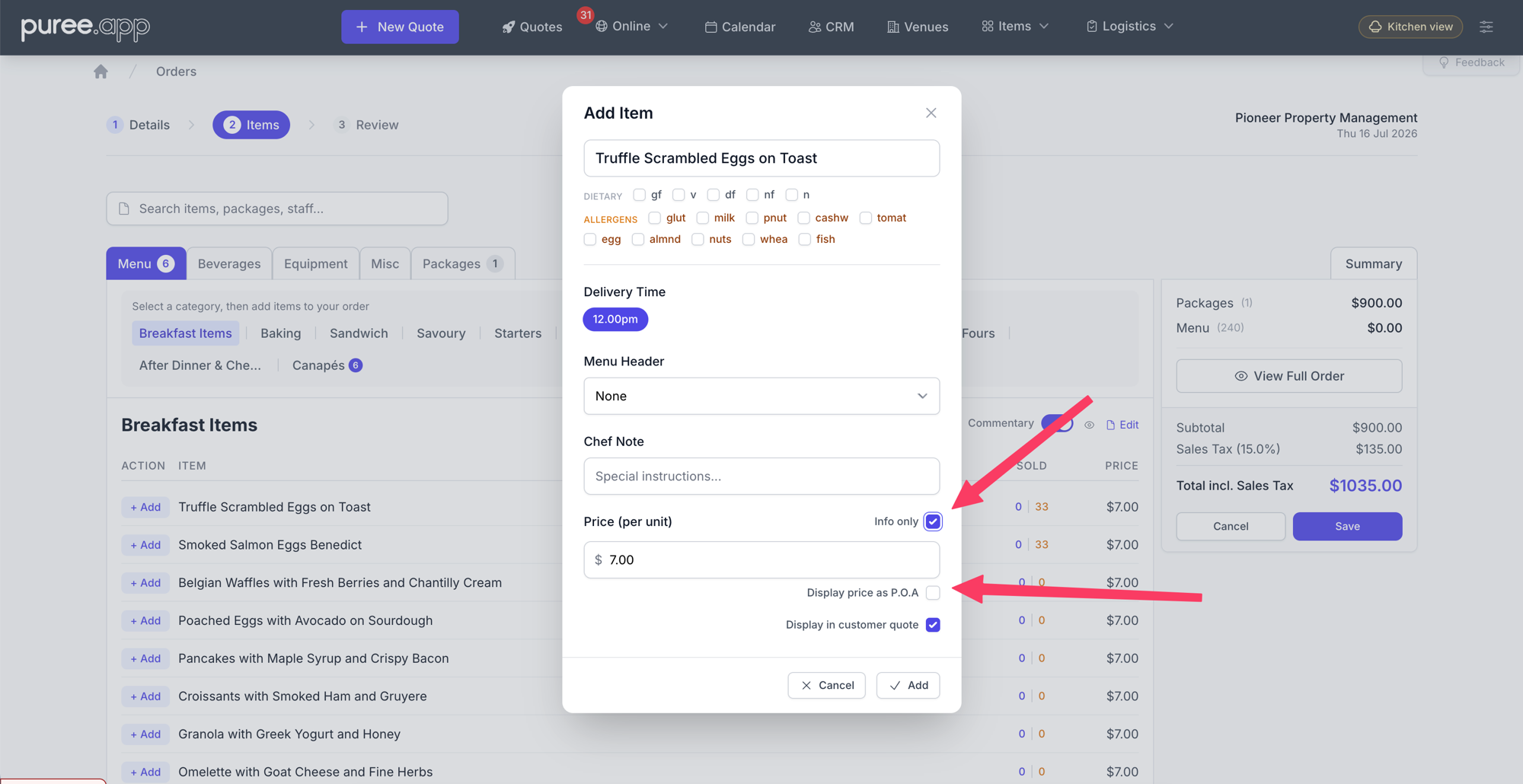
Switch on Info only and the Display price as P.O.A option appears beneath the price.
What P.O.A Builds On
P.O.A extends Puree’s Info-Only Items: Add Reference Items to Quotes without Quantities or Pricing. An info-only item is a reference line on a quote — it carries no quantity and no charge, and it’s deliberately kept out of your kitchen and delivery paperwork. Until now, an info-only item simply showed its name with an empty space where the price would be. P.O.A gives you a second choice for that space: show “P.O.A” to actively signal “price on application” rather than showing nothing at all.
How It Works
When you add or edit an item on a quote and switch on Info only, a new sub-toggle appears: Display price as P.O.A. Tick it, and that item will render “P.O.A” everywhere a price would normally sit on the customer-facing quote. Hovering over it shows a “Price on application” tooltip, so the abbreviation is never ambiguous.
The toggle only appears once Info only is enabled — P.O.A items are always info-only items — and it switches itself off automatically if you turn Info only back off. In the item builder list, the item shows “P.O.A” so you can see at a glance which lines are set this way.
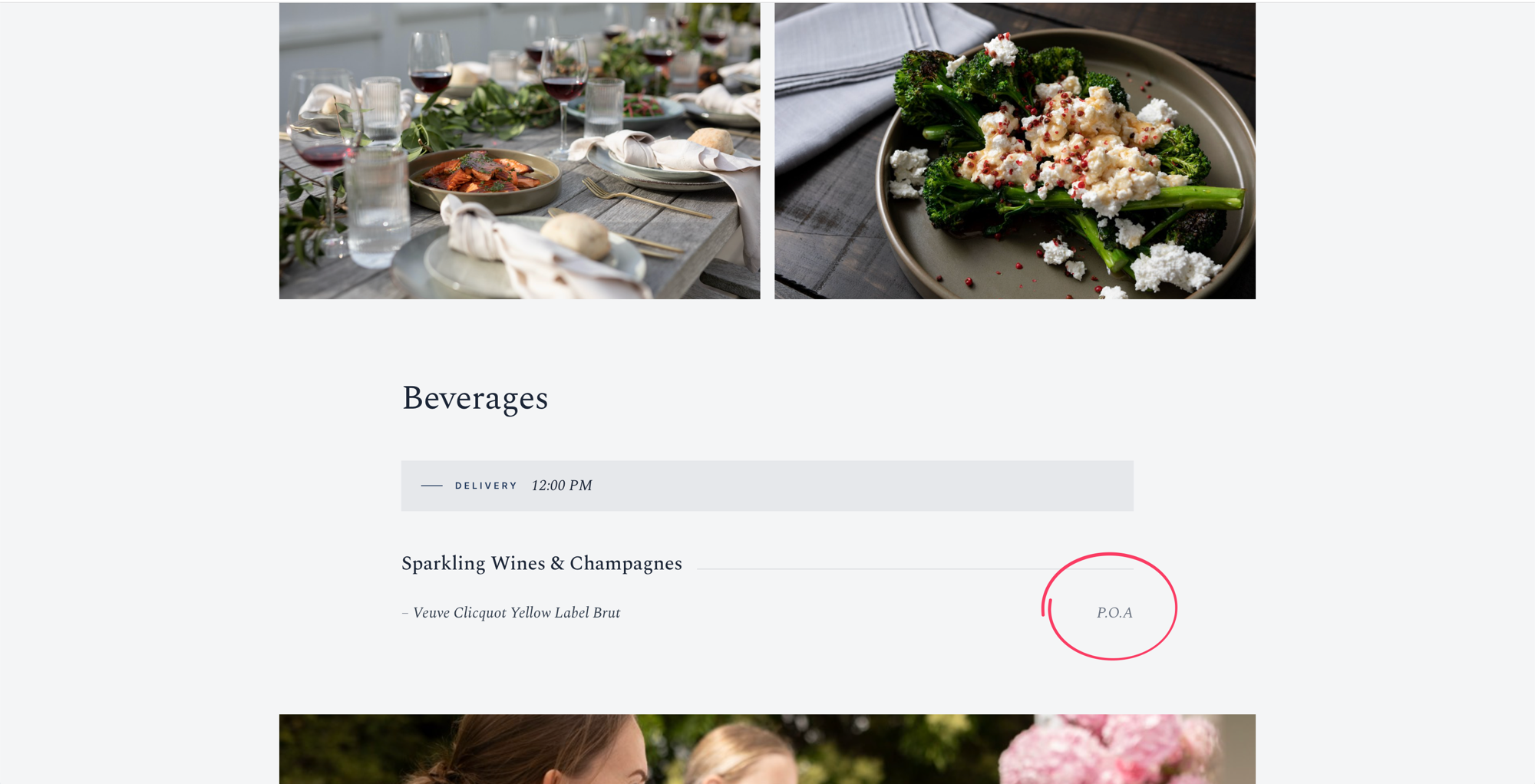
On the customer quote, the item shows “P.O.A” where a price would normally appear.
Where “P.O.A” Appears
P.O.A is a customer-facing signal, so it shows anywhere the customer sees the quote:
- The online (HTML) quote — “P.O.A” appears in place of the line price, styled to match the rest of the quote
- The PDF quote — the same “P.O.A” treatment carries through to the downloadable and emailed PDF
- Every styled quote template — each of Puree’s quote-template designs renders “P.O.A” in its own “included” style, complete with the tooltip, so it always looks intentional rather than like a missing value
Where It Doesn’t Appear
Because every P.O.A item is an info-only item, it stays completely out of your operational paperwork. P.O.A (and info-only) items are excluded from all dockets — chef, consolidated, beverage, equipment, driver and the event brief — as well as reports and menus. Your kitchen and delivery teams only ever see items they actually need to prepare and deliver.
Good to know: A quote made up entirely of P.O.A / info-only items now saves without issue. You can send a customer a quote that is purely “price on application” items while you finalise costings.
P.O.A on Packages
P.O.A also works at the package level, on a package’s fixed items. When you build a package, open the picker on the Fixed items card and switch on All items P.O.A in the footer — every fixed item in that card is then flagged as P.O.A, and the card shows a small P.O.A badge. Flexible choice items are always priced, so P.O.A isn’t offered for them.
If a package is made up entirely of P.O.A fixed items — with no flexible choices — it becomes a P.O.A package. Because there’s nothing to total, its per-guest price is ignored: the package adds no price to the order, and rather than showing a $0.00 line it’s left off the Packages section of the quote altogether. Its items still appear, each marked “P.O.A”, under their normal menu headers and categories. You’ll see a P.O.A badge on the Packages list, and a short note on the package’s edit screen explaining the pricing.
Tip: give your P.O.A items their own menu header — for example “Optional Extras” — so they read as a distinct “available on request” section on the quote instead of sitting among your priced items.
Common Use Cases
- Bespoke or made-to-order items — a custom cake or dessert table you’ll price once the brief is confirmed
- Market-priced produce — seafood platters, whole cuts, or seasonal items whose cost moves with the market
- Specialist hire or sub-contracted services — an item you need to confirm with a third-party supplier before quoting a figure
- “From” or on-request options — upgrades and extras you want the customer to know are available, with pricing to follow on enquiry
Getting Started
The Price on application option is available now on every quote. Add an item, switch on Info only, then tick Display price as P.O.A. No setup or configuration is required.
For step-by-step instructions, see our Price on Application (P.O.A).